How to Display Pokémon Cards Without Grading
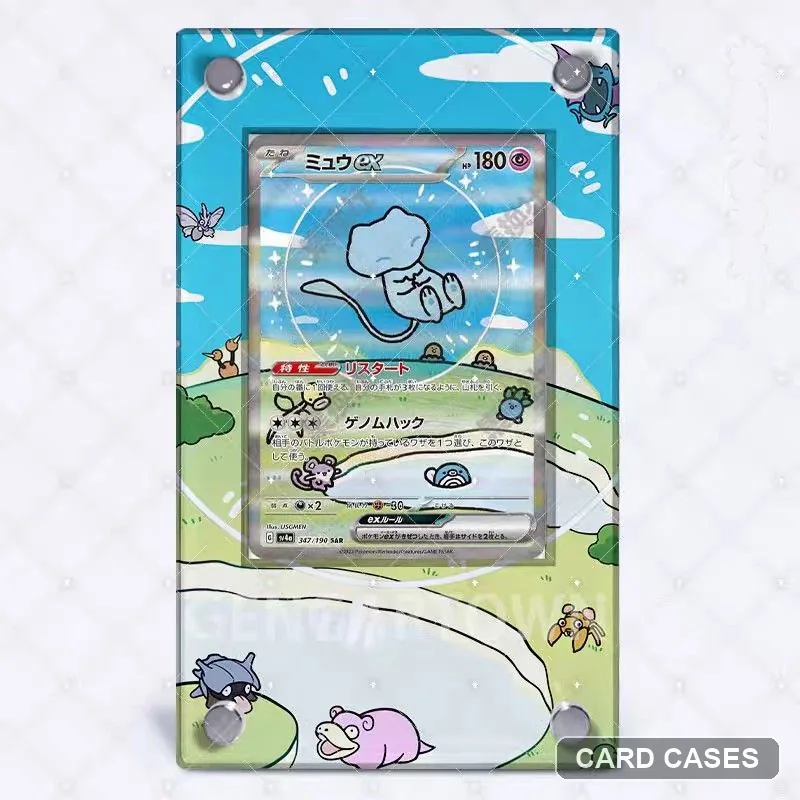
You can enjoy a card on display without sending it for grading. Start with a holder that fits the card and sleeve you actually use.
Raw card or graded slab?
A raw card is not enclosed in a grading-company slab. A PSA or CGC card already has its own outer holder, so it needs a different frame opening. Grading and choosing a display are separate decisions; buying a frame does not grade a card.
Choose a frame around your existing card
- Read the set code and full card number. Compare the printed scene and orientation with the product photos.
- Identify whether you are displaying a raw card, a PSA slab or a CGC slab. Other holders need a separate fit check.
- Tell us which sleeve or outer holder you use. Ask about the internal slot and thickness, as well as the external frame size.
- Confirm which components are included before choosing the format.
A concrete example: Mew ex 347/190
The Mew ex 347/190 gallery shows the Japanese SV4a artwork inside an extended scene. The picture helps you compare the design; it does not establish sleeve compatibility for every product version. Select Raw for a compatible ungraded card, or the correct graded format for your slab, after checking the fit.
Do not force a card into place
If fitting needs pressure, or the sleeve catches, stop and ask for help. A different sleeve, thickness or holder generation can change the fit. Keep your display away from direct sunlight and damp conditions.